In the era of Generative AI, companies are eager to harness Large Language Models (LLMs) like GPT-4 to search through internal company files, manuals, databases, and policies. However, feeding sensitive, proprietary business intelligence directly into public AI models poses a massive security risk. Without strict guardrails, your corporate IP, client details, and financial reports could be leaked or used to retrain public models.
To bridge this gap securely, enterprise architectures leverage a design pattern known as Retrieval-Augmented Generation (RAG). Instead of training a model on your private data, RAG retrieves relevant document snippets from a secure internal database first, and then passes only those snippets as context to the LLM to formulate an answer. For .NET engineers, Microsoft's Semantic Kernel SDK offers the ultimate framework to build private, secure RAG search engines natively in C#.
What is Retrieval-Augmented Generation (RAG)?
RAG acts as an "open-book exam" for AI. Instead of relying on the LLM's pre-trained memory (which is prone to hallucinations), the system searches your private documents first, extracts the exact paragraphs containing the answer, and asks the LLM to summarize the answer strictly based on that verified context.
Why Choose Semantic Kernel for C# AI Orchestration?
For years, Python's LangChain has dominated AI prototyping. However, in enterprise C# environments, introducing a separate Python microservice just for AI orchestration adds unnecessary deployment overhead, security risks, and latency. Microsoft's Semantic Kernel is a native, lightweight .NET SDK that resolves this. It allows C# developers to integrate AI prompts, memories, and plugins directly into their existing ASP.NET Core APIs and Entity Framework pipelines.
The Enterprise C# RAG Workflow
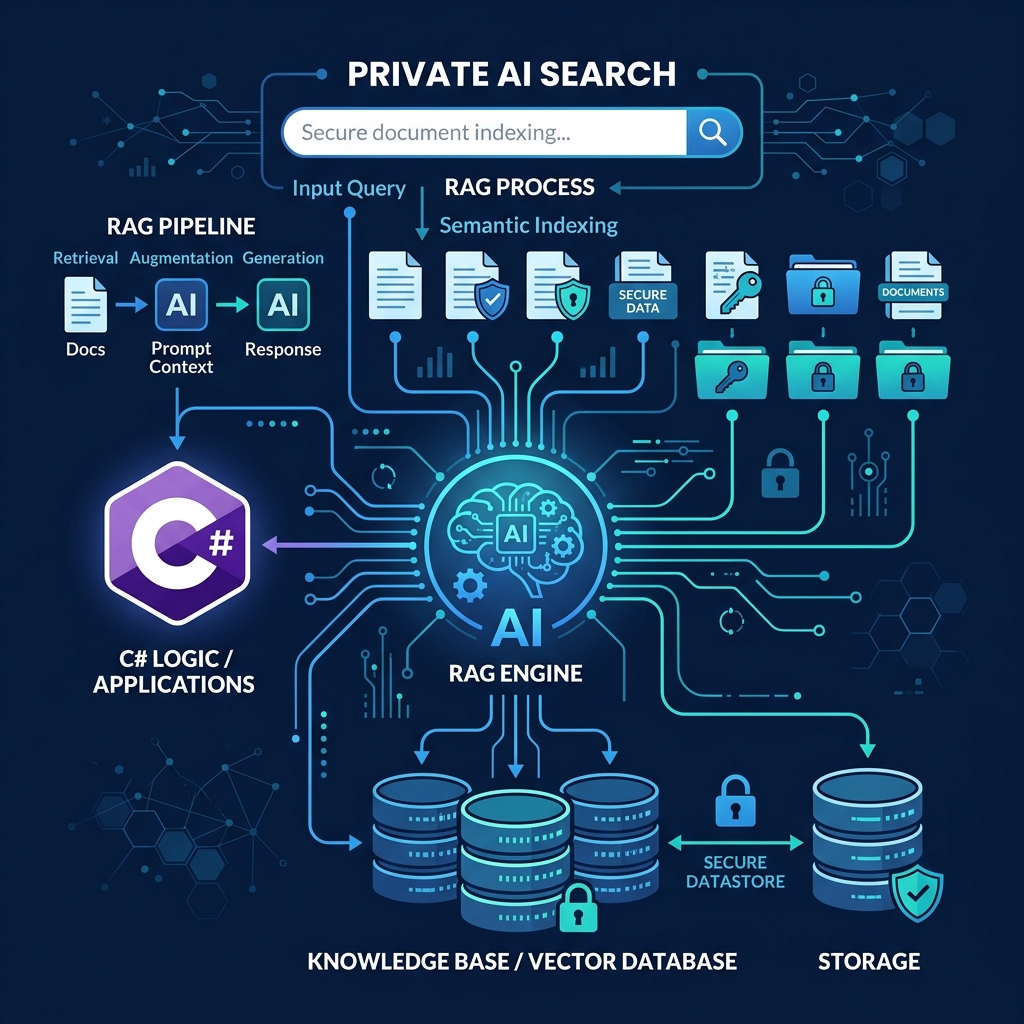
A production-ready RAG search engine follows three core stages: data preparation, retrieval search, and augmented generation.
| Pipeline Stage | Underlying C# Process | Goal & Output |
|---|---|---|
| 1. Ingestion & Embedding | Documents are chunked into paragraphs; text is converted into math coordinates (embeddings) via Azure OpenAI. | Vectors are stored in a Vector DB (e.g. Qdrant, PGVector, or Azure AI Search) with Metadata. |
| 2. Semantic Search | The user's query is converted to a vector and compared against the DB using cosine similarity. | Returns the top 3-5 most contextually relevant document paragraphs in sub-milliseconds. |
| 3. Grounded Prompting | Semantic Kernel formats a prompt combining the user's query and the retrieved document context. | Azure OpenAI generates a natural language answer strictly grounded in your private documents. |
Implementing RAG in ASP.NET Core: Code Example
The following C# code demonstrates how to set up Semantic Kernel, query an Azure AI Search vector store, and generate a grounded response using Azure OpenAI Services in .NET 9:
using Microsoft.SemanticKernel; using Microsoft.SemanticKernel.ChatCompletion; public class EnterpriseSearchService { private readonly Kernel _kernel; private readonly IVectorStoreRecordCollection<string, DocumentChunk> _vectorStore; public EnterpriseSearchService(Kernel kernel, IVectorStoreRecordCollection<string, DocumentChunk> vectorStore) { _kernel = kernel; _vectorStore = vectorStore; } public async Task<string> SearchPrivateDocumentsAsync(string userQuery) { // 1. Perform Semantic Search on the Vector Database var searchResults = await _vectorStore.VectorizedSearchAsync(userQuery, new VectorSearchOptions { Limit = 3, TopN = 3 }); // 2. Aggregate the retrieved paragraphs as context var contextBuilder = new StringBuilder(); await foreach (var result in searchResults.Results) { contextBuilder.AppendLine($"Source: {result.Record.DocumentName} | Content: {result.Record.Text}"); } // 3. Define the grounded prompt instructions var prompt = $$$""" You are a secure corporate AI assistant. Answer the user's query strictly based on the provided verified context. If the answer cannot be found in the context, politely reply that you do not have that information. Do not use your own knowledge or hallucinate. Verified Context: {{{contextBuilder}}} User Query: {{{userQuery}}} """; // 4. Invoke Azure OpenAI via Semantic Kernel var chatService = _kernel.GetRequiredService<IChatCompletionService>(); var response = await chatService.GetChatMessageContentAsync(prompt); return response.Content ?? "No response generated."; } }Key Benefits of Enterprise C# RAG
Building your AI pipelines directly inside the .NET ecosystem yields major business and technical advantages:
- 100% Data Security: Data remains entirely within your private Azure tenant boundary, complying with GDPR, HIPAA, and corporate security guidelines.
- Zero Hallucinations: By forcing the AI model to answer only based on verified document context, you eliminate false information.
- Sub-Second Execution: Compiling C# services and utilizing pooled Azure connections results in production-grade speeds.
Architect's Tip: Hybrid Search
For the best search accuracy, combine Vector Search (which understands meaning) with traditional Keyword Search (which finds exact ID numbers or product codes). Azure AI Search supports this natively as "Hybrid Search" and Semantic Kernel makes it extremely easy to execute via C# APIs.
At Krista Technology, we are a Microsoft Solutions Partner helping enterprises build secure AI engines, search portals, and smart ERP automation pipelines. If you want to build custom AI Search tools or integrate Large Language Models into your existing systems, our dedicated .NET developers are ready to design your architecture.