For modern digital businesses and SaaS startups, maintaining separate development teams for web portals, iOS apps, and Android apps is a massive financial and operational burden. Having to rewrite the same business logic, database client schemas, and user interfaces across three different codebases (React, Swift, and Kotlin) slows down release velocity and duplicates engineering costs.
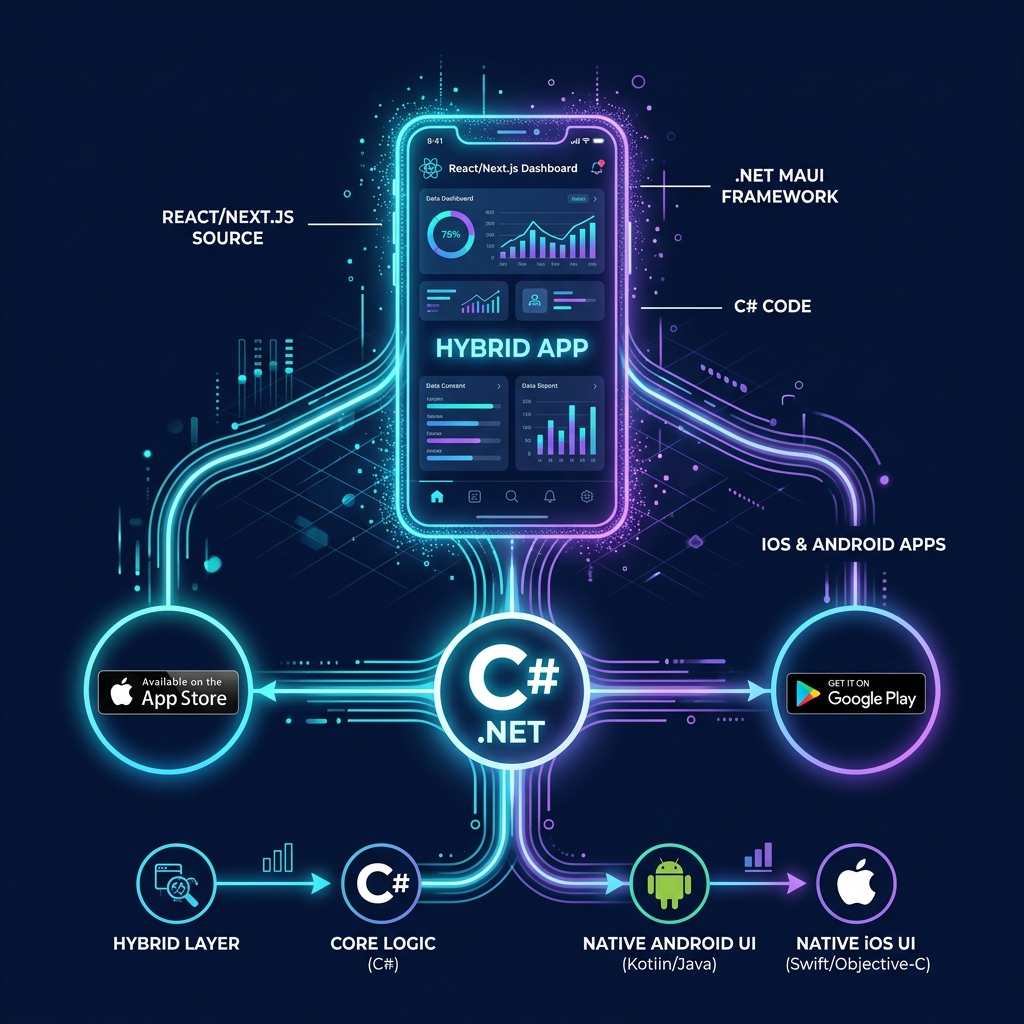
Fortunately, there is a smarter way. If you already have a responsive, high-performance web portal built in React or Next.js, you can leverage .NET MAUI (Multi-platform App UI) WebView wrappers to build native mobile applications. This hybrid app architecture allows you to reuse 99% of your existing web code, wrap it inside a native C# shell, and deploy fully functional mobile apps to the Google Play Store and Apple App Store in a fraction of the time.
What is .NET MAUI Hybrid WebView?
Unlike standard browser-based WebViews that run isolated from the mobile device, .NET MAUI Hybrid WebView establishes a secure, bi-directional bridge. This allows your frontend React JavaScript code to directly invoke native C# code on the host device, unlocking full access to local hardware sensors, storage databases, and system APIs.
1. Web-to-Mobile Conversion Pipeline
The transition from a standard web browser experience to a native store-ready mobile app relies on a three-stage wrapper pipeline:
Responsive Web Portal
Your React / Next.js web application is optimized for mobile touchscreens, responsive layouts, and offline client caching states.
.NET MAUI C# Wrapper
A native C# mobile container hosts the web assets inside an optimized hardware-accelerated WebView engine with JS-to-C# bridge scripts.
App Store Compilation
Compiles into native .APK/.AAB files for Android and .IPA packages for iOS, ready to publish on Apple and Google Play stores.
2. Accessing Native Device APIs from React
Because .NET MAUI acts as a native proxy shell, your web frontend is no longer trapped inside browser sandbox limits. You can trigger C# scripts to interact with the following hardware components:
GPS Location & Accelerometer
Capture highly accurate background GPS telemetry coordinates and device orientation metrics directly from the C# host service and feed them into your React UI maps.
Biometrics (FaceID & TouchID)
Secure your login endpoints by calling native iOS FaceID and Android fingerprint biometric dialogs, sending the validation callback back to your React auth state.
Local SQLite Database Caching
Store gigabytes of client data securely on-device using a local C# SQLite engine, allowing your app to operate seamlessly in completely offline environments.
In-App Push Notifications
Register devices with Apple APNS and Google FCM using native C# scripts, sending instant push notifications to user lockscreens even when the app is closed.
3. The 7-Day Fast-Track Launch Timeline
While custom native app development takes 3 to 6 months, wrapping an existing responsive web portal using .NET MAUI can be completed inside one sprint:
Days 1-2: WebView Container Setup
Bootstrap the .NET MAUI C# mobile project, insert the Blazor Hybrid / Native WebView control, and point it to the React web server URL.
Days 3-5: Native JavaScript-C# Bridge
Configure JavaScript injection interfaces. Connect biometric check buttons and background GPS trackers inside React to C# handlers.
Days 6-7: App Store Compilation & Release
Bundle the app with custom splash screens and app icons. Sign the packages with Apple and Google certificates and submit for review.
4. Comparison: Native vs. WebView vs. .NET MAUI Hybrid
The matrix below compares custom native codebases, simple browser wrappers, and modern C# Hybrid WebView architectures:
| Evaluation Metric | Pure Native (Swift/Kotlin) | Simple Web Wrapper | .NET MAUI + React Hybrid |
|---|---|---|---|
| Code Reusability | 0% (Completely separate codebases) | 99% (Just points to website) | 95%+ (Share UI and Logic) |
| Native Hardware Access | 100% Full Access | 0% (Blocked by browser shell) | 100% Full Access (via C# proxy) |
| Development Cost | Very High (Requires 3 developer teams) | Ultra-Low | Low (1 team of .NET engineers) |
| Performance & UX | Elite (Maximum performance) | Poor (Slower rendering, no offline) | High (Hardware-accelerated) |
Architect's Tip: Implement Asset Pre-Loading for Blazing Speed
Instead of loading your React assets over a remote HTTPS URL on every app launch, compile your React build bundle and embed it locally within the .NET MAUI static app assets folder. This allows the application shell to render the UI instantly from the device storage, bypassing slow cellular network load times.
Partner with Krista Technology for High-Performance Mobile Apps
Converting web platforms into native store-ready mobile apps, configuring secure JavaScript-to-C# bridges, and optimizing hybrid assets require senior-level software architecture expertise. At Krista Technology, we are a Microsoft Solutions Partner specialized in building cross-platform .NET MAUI shells, integrating custom React portals, and releasing compliant corporate mobile systems globally.
If you want to convert your responsive web portal into a native mobile app quickly, optimize an existing hybrid app, or hire a team of dedicated mobile developers, contact our dedicated .NET MAUI Engineers today for a free technical consultation and estimation.